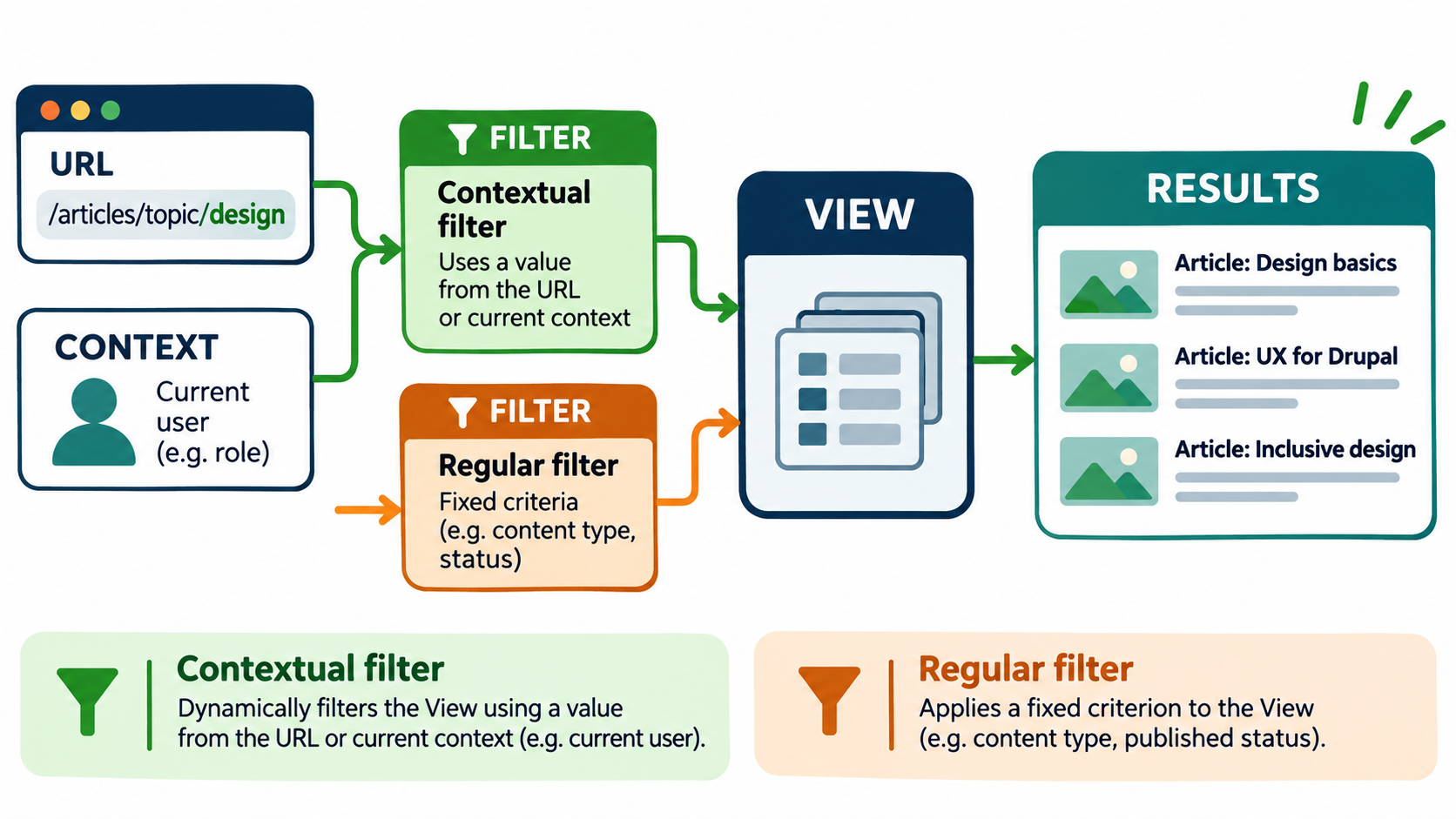
Editorial illustration; the URL, user and results are representative examples, not a live Drupal administration screen.
A regular Drupal Views filter answers a fixed question: show published articles, show products in a category, or show content of a particular type. A contextual filter answers a changing question: show articles for the topic in this URL, or show content related to the current user.
That flexibility is useful for author pages, category-like paths, related-content blocks and reusable landing pages. It also adds a hidden input. If the value comes from a URL or another piece of context, the View must define what happens when the value is missing, invalid or too broad.
Summary
- Use a contextual filter when a View should receive a value from its context; use a regular filter for fixed criteria.
- Start with a clear URL or relationship, validate the value, and define a safe behavior for missing or invalid input.
- Test valid, missing, invalid, empty and restricted cases before placing a contextual View on a public page.
Regular and contextual filters are different
A regular filter is part of the View’s fixed configuration. For example, it can limit results to published Article nodes. Visitors do not change that condition unless you expose it as a filter or change the configuration.
A contextual filter receives a value from the display context. The common example is a value in the URL, such as /articles/topic/design, which can be passed to a filter for a taxonomy term or another field. Drupal’s Views documentation also describes context from the current date, current user or other values detected by the View calculation.
The distinction matters because contextual input can vary for every request. You need to decide whether an unknown value shows no results, a default list, a page not found response or another controlled outcome.
Identify the context first
Before opening the Views UI, write one sentence: “This display receives ___ from ___ and returns ___.” For example: “This block receives a topic term from the route and returns published help articles tagged with that term.”
Name the source precisely. Is the value a term ID, a term name, a node ID, an author ID or a string from a URL? The field selected in the contextual filter must match the value you intend to pass. A human-readable path segment and an internal numeric ID are not interchangeable without a mapping or relationship.
Also decide whether the value is trusted only as a lookup or should affect access. A contextual filter narrows a result set; it does not replace Drupal’s access control design.
Add a contextual filter in Views
The exact labels can vary between Drupal versions and administrative permissions, but the core workflow is consistent.
- Open the View display you want to change.
- Expand the Advanced area and find Contextual filters.
- Select Add and choose the field or relationship that represents the context.
- Apply and configure the filter.
- Set the value source, validation and behavior for missing input.
- Preview the display with a known valid value.
- Check the generated path or block context before placing it on the live page.
Drupal’s documentation notes that a relationship may be needed when the context is based on something other than a direct value in the URL. For example, a related author or referenced term may require the View to traverse a relationship before it can filter the intended content.
Decide what happens when input is missing
This choice is part of the user experience and the security boundary. If the View expects a URL value and none is present, you might show no results to avoid displaying an unfiltered list. In another display, a default topic may be useful. A block placed on a page may receive context differently from a page display, so test the actual placement.
Avoid silently falling back to “show everything” when the result could expose content or create an expensive query. The safest default depends on the content and access model, but it should be deliberate and documented.
Validate the value
Validation helps prevent a contextual value from being interpreted more broadly than intended. Where the UI offers validation, choose the expected type and define what should happen when the value does not exist. A numeric ID should not be treated as an arbitrary title; a term name should not be assumed unique if editors can create duplicates.
Use a controlled route when possible. A path such as /articles/topic/design is easier for people to understand, but the system still needs a reliable way to resolve design to the correct taxonomy term. If aliases or translated paths are involved, include those in testing.
Combine contextual and regular filters
The strongest Views usually combine both kinds. A contextual filter can select the topic from the route while a regular filter limits results to published Article content. Another regular filter can exclude archived items or restrict a content type.
This combination reduces surprises. The context answers “which slice?” while fixed filters answer “which records are eligible at all?” Do not rely on the URL value to enforce publication status, content type or editorial rules that should apply to every display.
Use relationships carefully
A relationship lets a View reach a related entity, such as a referenced taxonomy term or author. It can make a contextual filter possible, but it can also multiply rows or make the query harder to understand. Preview the output after adding a relationship and check whether duplicate results appear.
If the relationship is optional, decide whether missing relationships should exclude the item or preserve it. Keep the field and relationship names documented so another site builder knows why they exist.
Test the whole input matrix
Do not test only the happy path. Use at least these cases:
- a valid value that should return several results;
- a valid value that should return no results;
- no value at all;
- an invalid or unknown value;
- a value for restricted or unpublished content;
- a value with translated text or a path alias if the site supports them.
Check the page title, result count, empty state, pager, cache behavior and links. A dynamic block can look correct in the View preview but receive no context when placed on a page. Test the actual route and role that visitors will use.
Access is still a separate requirement
A contextual filter is not an authorisation mechanism. If a user should not see a node, file, field or related entity, the site must enforce that through Drupal’s access model and the display configuration. Test as anonymous users, ordinary authenticated users, editors and any custom roles.
Pay attention to counts and exposed metadata. Even if a link is denied, a result count or title can reveal that restricted content exists. Include access checks in regression testing after changing relationships, permissions or the content model.
Performance and maintenance
Contextual filters can be efficient when the field is indexed and the query is narrow, but do not promise performance from configuration alone. Test with realistic content volume and real paths. A broad value that returns thousands of rows can make a page slow even when the normal case is quick.
Document the expected input, route pattern, fallback behavior and responsible content owner. When editors add terms, change aliases or rename fields, revisit the View. When a module or custom relationship changes, rerun the input matrix.
Mistakes to avoid
- Using a contextual filter for a condition that should always be fixed.
- Assuming an absent value will automatically produce a safe result.
- Passing a term name when the filter expects an ID, or the reverse.
- Adding a relationship without checking duplicate rows and query cost.
- Testing only as an administrator.
- Treating contextual filtering as a replacement for access control.
For related guides that complement this checklist, see:
- How to Set Up Drupal and MySQL on Your Local Machine Using Docker: A Complete Step-by-Step Guide
- Drupal Changes Are Not Showing? How to Troubleshoot Cache Without Clearing Everything
- Drupal Configuration Changes Should Travel as Code: A Safer Deploy Workflow
My Take
Contextual filters are powerful because they make one View reusable across many routes. The maintainable approach is to treat the context as an input contract: define its type, source, validation, fallback and access expectations. If you cannot explain those five things, the View is not ready for production.
Bottom Line
Use contextual filters when the listing should respond to a URL, user or other runtime value. Keep fixed editorial rules as regular filters, validate the input, design a safe missing-value behavior and test the real route with multiple roles. Dynamic Views become dependable when their context is explicit rather than magical.