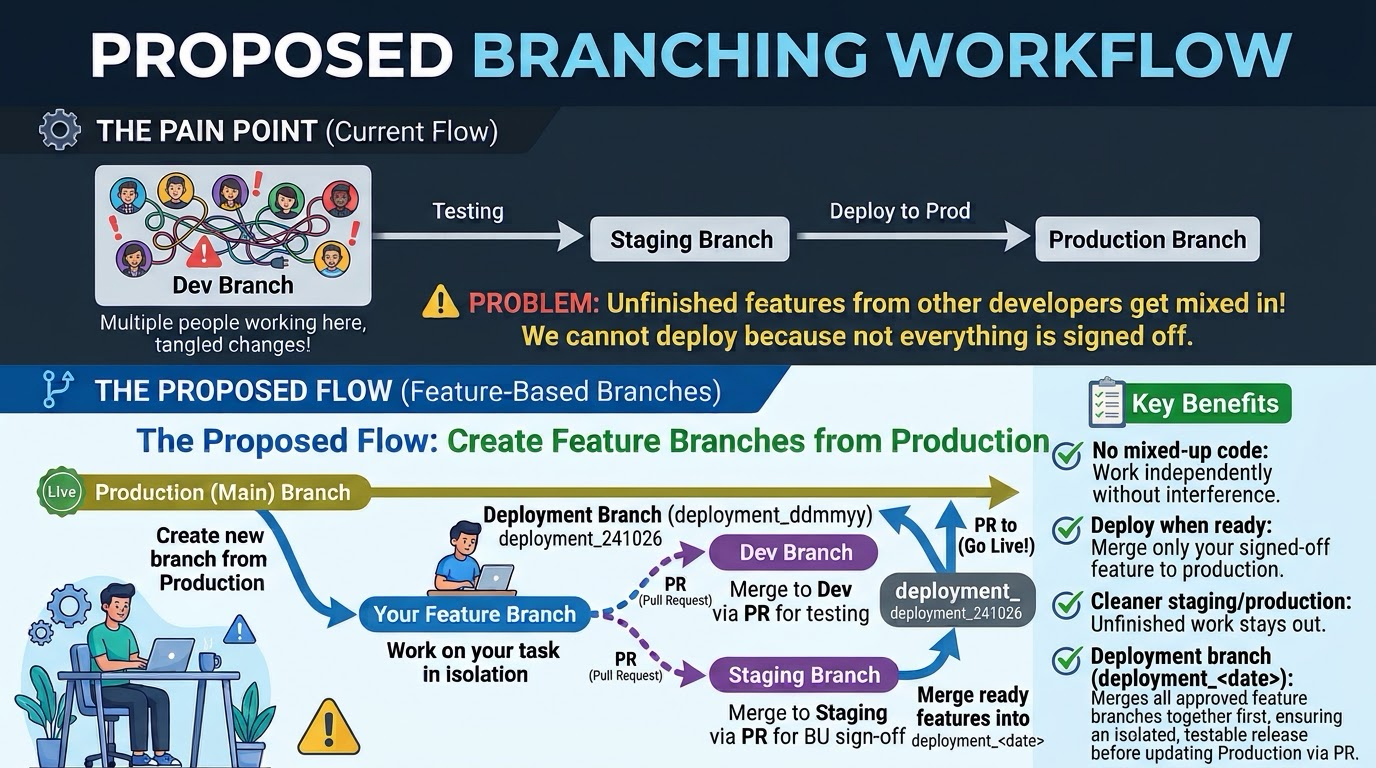
Editorial illustration: a feature-based branching workflow for separating development, testing and production release decisions.
Many teams do not have a deployment problem. They have a mixing problem. Several developers work on one shared branch, so staging receives ready, half-built and undocumented changes together. When deployment day arrives, the team must choose between releasing unfinished code and delaying work that is ready.
The solution is not to create branches for the sake of creating branches. It is to make each branch answer one clear question: what is being built, what is being tested, or what is being released?
Quick Answer
Keep main as the production branch. Create a short-lived feature branch from the latest main for each task. Open a pull request from that feature branch into the development or testing branch when it is ready for collaboration. When a release is planned, merge only approved feature branches into a dated deployment branch such as deployment_20261022. Test and obtain business sign-off there, then merge that deployment branch into main through a final pull request.
This separates unfinished work from release candidates. It also gives the team a visible place to answer, “Exactly what are we sending live?”
Why a shared development branch becomes painful
A shared branch feels efficient at the start. Everyone pushes to one place, the latest work is always nearby, and the team avoids creating many pull requests. The cost appears later.
If Alice’s search filter is ready but Ben’s checkout redesign and Chen’s payment upgrade are unfinished, merging all three into dev makes the staging result difficult to diagnose. A release manager cannot deploy only the search filter without manually reversing the other changes.
This is the pain point shown in the illustration: staging receives work before every item has earned the right to be there.
The proposed model: separate the levels of stability
The workflow uses a small number of branches with different responsibilities:
maincontains production-ready code. It should be protected from direct pushes and changed through reviewed pull requests.- Feature branches contain one feature, fix or closely related piece of work. They are short-lived and owned by the person or small group doing that task.
devis an integration area where selected feature branches can be tested together. It is not automatically a promise that every commit is ready for production.stagingis used for a more release-like test environment and business or user-acceptance checks.- A dated deployment branch, such as
deployment_20261022, is a release candidate containing only the features chosen for that deployment.
The names can vary. The important part is the contract. If everyone believes staging means “safe to deploy” while the branch owner treats it as “anything currently under development,” the workflow will still fail.
The proposed workflow applies Git’s stability levels and topic branches while making the release assembly step explicit. A branch is useful when its purpose is understandable to the people who must work with it.
Step 1: Create a feature branch from production
Start with a current local copy of main:
git switch main
git pull --ff-only origin main
git switch -c feature/search-filters
The exact prefix is a team choice. feature/, fix/, chore/ and an issue number can all work if they are consistent. The important decision is the starting point: create the branch from the latest production baseline unless the task deliberately depends on another unreleased change.
Starting from main keeps the branch’s history easier to understand. It also means the pull request shows the work that belongs to that task rather than a week of unrelated changes from a busy shared branch.
Step 2: Keep the feature branch narrow
Commit the changes needed for the one task. Add tests, documentation and migration files that belong to it, but resist the temptation to tidy every nearby file. A narrow branch is easier to review, easier to test and easier to remove when the requirement changes.
Before opening a pull request, run the checks that can be run locally:
git status
npm test
npm run build
Use the commands appropriate for the project. The point is to catch obvious failures before asking someone else to investigate them. A clean local build does not replace CI, but it makes the review conversation more useful.
Step 3: Use pull requests as decisions, not just buttons
When the feature is ready for review, push the branch and open a pull request into dev or the agreed integration branch:
git push -u origin feature/search-filters
The pull request should explain the user problem, intended behaviour, tests and known limitations. Build the application, run automated tests, inspect migrations and check security-sensitive changes before asking reviewers to approve it.
The pull request into dev does not mean “release this.” It means “allow this isolated work into the integration level so we can learn how it behaves with the selected set of work.”
Step 4: Promote selected work through testing
After a feature is merged into dev, deploy that branch to the development environment. Test the feature in context, including interactions with other changes that are intentionally present.
When a feature is ready for staging, promote it through a pull request or a controlled merge into staging. Keep the promotion visible. Do not silently copy commits between branches with a manual command that nobody can later explain.
At this stage, ask questions that code review cannot answer: does the workflow make sense to a real user, does it work with realistic data and permissions, are integrations behaving correctly, and is the rollback or feature-disable path understood? Testing is also about making the release decision legible to people who did not write the code.
Step 5: Assemble a dated deployment branch
When a release window is agreed, create a deployment branch from the latest production baseline:
git switch main
git pull --ff-only origin main
git switch -c deployment_20261022
Merge only the feature branches that are approved for this release, normally through pull requests into the deployment branch. The branch now acts as a release candidate. If feature/search-filters and feature/export-csv are approved but feature/new-checkout is not, the deployment branch contains the first two without the third.
This is the key improvement over a shared development branch. Release scope is assembled deliberately. The team can inspect the deployment branch, compare it with main, run the full release checks and discuss a concrete set of changes.
The date identifies the release conversation. After deployment, create a tag or link the deployment record to the exact commit so the running version can be identified later.
Step 6: Test the release candidate and get sign-off
Deploy the dated branch to staging or a production-like environment. Run regression, migration, smoke and business acceptance checks there. If the release includes a database change, verify both the forward migration and the application’s behaviour during the transition.
If a problem appears, fix it on the relevant feature branch or a release-fix branch, then merge the correction into the deployment branch. Avoid making an unrecorded change directly on the staging server. The release candidate should remain reproducible from version control.
Sign-off should be specific. “Looks good” is less useful than “The customer can create, edit and export an order using the approved role.” A short record gives the release manager a reason to merge rather than a feeling that the environment looked quiet.
Step 7: Merge the deployment branch into main
Once the release candidate passes its checks, open the final pull request from deployment_20261022 into main. This pull request represents the production decision. Review the change list, deployment notes, migrations, rollback plan and approvals one more time.
After merging, deploy main through the normal pipeline and verify smoke tests, important journeys, logs, queues and integrations. For an emergency fix, branch from the production commit and bring the correction back into ongoing branches so the next release does not reintroduce it.
Rules that keep the workflow healthy
The branch model only works when its rules are easy to follow:
- Protect
main; do not use it as a personal workspace. - Keep feature branches small enough to review.
- Make the deployment branch from a known production baseline.
- Require automated checks and record what was tested before merging.
- Document how urgent fixes move through the same levels.
A workflow that handles normal features but has no answer for an urgent production bug will be bypassed under pressure.
Common mistakes
The first mistake is treating branch names as process. Renaming develop to staging does not make it a release branch. The team must agree what can enter it and what evidence is required before promotion.
The second mistake is keeping feature branches alive for months. Long-lived branches drift from main, accumulate conflicts and become difficult to test. If a feature is large, split it into smaller safe changes or hide incomplete behaviour behind a temporary feature flag.
The third mistake is using cherry-pick as the normal release process without a record. It can be useful, but it creates a second mapping between changes and commits. Prefer pull requests and visible merges when the repository’s history needs to explain how a release was assembled.
My Take
The best branching workflow is the smallest one that makes release scope obvious. A team does not need seven permanent branches to become disciplined. It needs isolated feature work, a shared testing path, a release candidate that can be named, and a protected production branch.
The dated deployment branch gives everyone the same object to discuss: developers see what is included, testers reproduce the candidate, and operations can identify the commit that should go live.
Bottom Line
Do not make staging carry every unfinished idea. Start each task from production, work in an isolated feature branch, review and test it before promotion, then assemble only approved work into a dated deployment branch. Deploy that candidate after sign-off and merge it into protected main.
The result is not a promise that releases will never fail. It is a workflow that makes failures narrower, release scope clearer and unfinished work less likely to surprise the person responsible for production.
Sources: Git branching workflows in the Pro Git book, GitHub pull request documentation, and GitHub’s guide to writing code for a project.