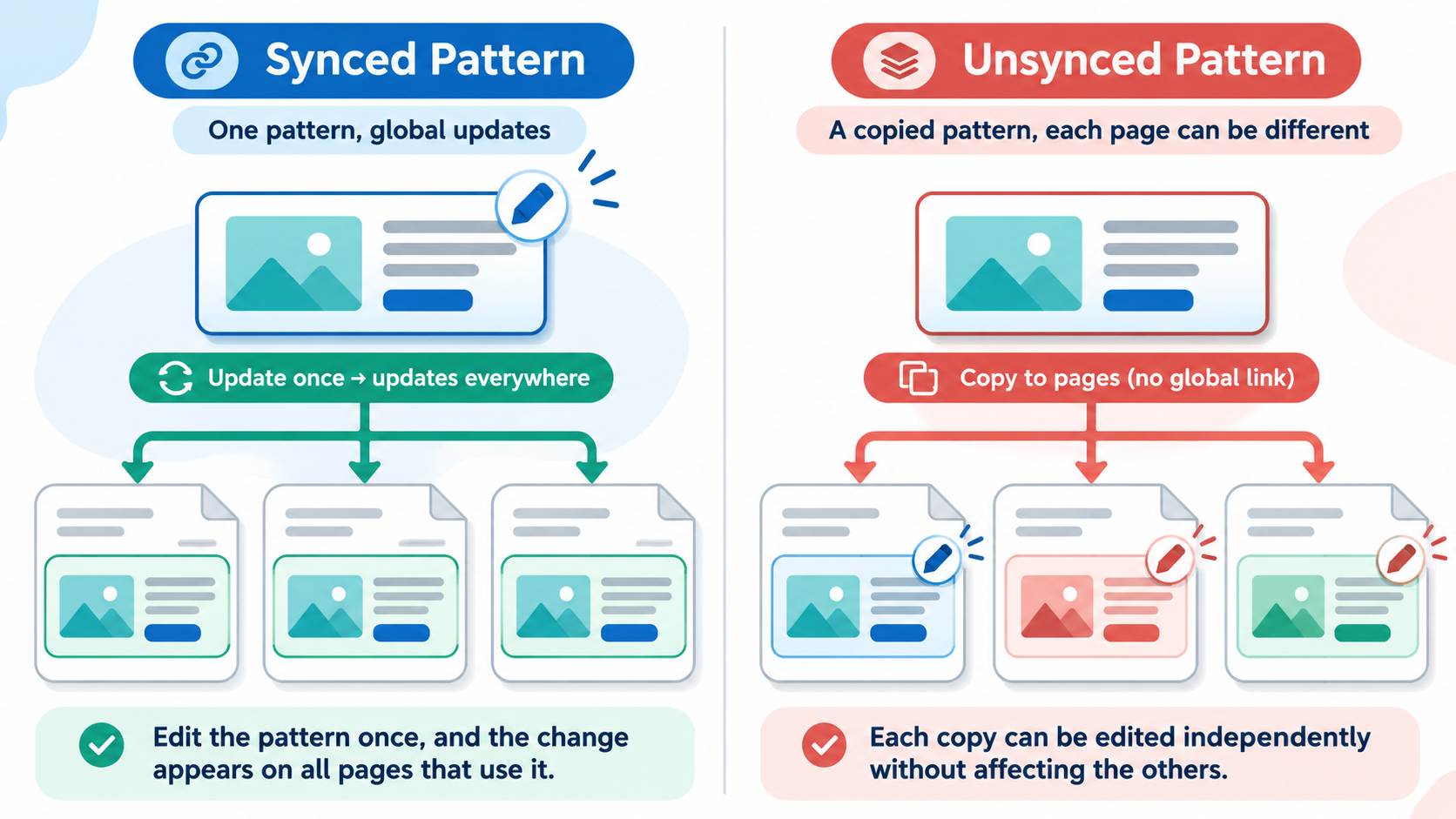
Editorial illustration; the editor is representative and is not a live WordPress installation.
Reusable layouts are useful until a team is unsure whether changing one copy will change every page. WordPress patterns solve that problem, but the choice between synced and unsynced is a content decision as much as an editing decision.
Quick Answer
Use a synced pattern when the same content and design should change everywhere, such as a standard contact block or legal notice. Use an unsynced pattern when you want a reusable starting layout but each inserted copy should become independent. If you need one shared design with different text in each instance, investigate content-only editing and overrides in the WordPress version you operate, then test the workflow before using it across a large site.
The difference that matters
An unsynced pattern inserts a new instance of its blocks. Editors can change that copy without changing other uses or the original pattern. A synced pattern remains connected: editing the pattern updates its instances across the site.
That distinction is powerful and risky. A synced pattern can keep a phone number, opening hours, or call to action consistent. It can also change an old campaign page when an editor intended to update only a new article.
How to create a pattern safely
- Build the block group in a draft page or post.
- Select the blocks, open the options menu, and choose the command to create a pattern.
- Give it a name that describes its job, not just its appearance. “Support contact — global” is clearer than “Blue box”.
- Add a useful category so another editor can find it.
- Choose the synced option only after writing down whether future edits should be global.
- Insert it into a test page and edit a copy before adding it to important content.
- Check the front end on mobile and desktop, then document who may edit the original.
The exact labels can vary with the editor and WordPress version. The underlying decision remains the same: shared instance or independent copy.
Good uses for synced patterns
Synced patterns work well for content that has one source of truth. Examples include a support contact block, a standard disclaimer, a donation prompt that must remain consistent, or a maintenance notice that needs to be changed quickly in multiple locations.
Treat these patterns like shared configuration. Give them names that signal their scope. Keep the copy short enough to review. Before editing the original, search for where it is used and consider whether a global change is safe on old pages as well as new ones.
Good uses for unsynced patterns
Unsynced patterns are useful for repeatable page shapes: a case-study introduction, an event summary, a product comparison, or a staff profile. The layout can be consistent while the heading, image, and details vary.
Do not use an unsynced pattern as a promise that every future design change will reach existing pages. Once inserted, the copies are independent. That is the point, but it means a later design correction may require a content review or a different reusable strategy.
A realistic editorial example
Suppose a small organisation publishes monthly workshops. The registration instructions are the same for every workshop, but the date, speaker, and image change. A synced pattern for the stable contact and registration information can reduce mistakes. An unsynced pattern for the workshop layout lets an editor change the event details without changing last month’s page.
If the registration URL changes, the team can update the synced block once and then verify several pages. If the organisation wants different instructions for a special event, it should detach or replace that instance deliberately and record the exception.
What to test before rollout
Create a test page with two instances of the proposed pattern. Change the original and confirm whether both instances behave as expected. Then edit one inserted copy and confirm whether the change stays local. Test undo, preview, mobile layout, permissions, and the workflow for finding the original later.
If several people edit content, ask one person who did not create the pattern to identify its scope from the name and instructions. If they cannot, the pattern is not ready for broad use.
Keep the pattern catalogue understandable
Patterns are a content library, so they need maintenance. Assign a naming convention that tells editors whether an item is global, a starting layout, or tied to a campaign. For example, prefixes such as Global, Layout, and Campaign can help, but only if the team uses them consistently. Add a short description explaining what may be changed and who owns the original.
Review unused patterns during a normal content-maintenance cycle. Before deleting one, search for pages that may still contain its blocks and check whether the site stores a revision or export that would help recovery. A pattern that is no longer offered in the inserter can still leave existing content in place, so “not visible in the library” is not the same as “not used anywhere”.
Handling a global change
When a synced pattern needs an update, write down the intended change and the pages that should be checked afterwards. Make the edit at a low-traffic time when practical, preview the original, and visit representative pages that use it. Check links, contrast, line wrapping, translations, and mobile spacing. If the change is urgent, record the reason so the team can review it later instead of treating an emergency edit as normal governance.
If only one page needs a variation, detach or replace that instance deliberately. Do not edit the original to solve a local exception. A local exception is a content decision and should be visible in the page’s history or editorial notes.
Mistakes to avoid
Do not mark every pattern as synced just to make design maintenance easier. Do not store time-sensitive page-specific content in a global pattern. Do not use vague names. Do not assume detaching a pattern will preserve every future update. Do not skip a backup or revision check before a global edit.
Theme-registered patterns also have different management behaviour from patterns created in the admin interface. Check the official documentation for the WordPress version and theme architecture you support instead of copying a workflow from an older tutorial.
My Take
Patterns are most useful when the team can explain their scope in one sentence. “This is the shared contact block” is a good synced pattern rule. “This is a starting layout for individual pages” is a good unsynced rule. If nobody can answer that question, the problem is naming and governance, not a missing plugin.
Bottom Line
Choose synced for one shared source of truth and unsynced for independent copies. Test both behaviours on a staging or low-risk page, name patterns by purpose, and document who owns global changes.