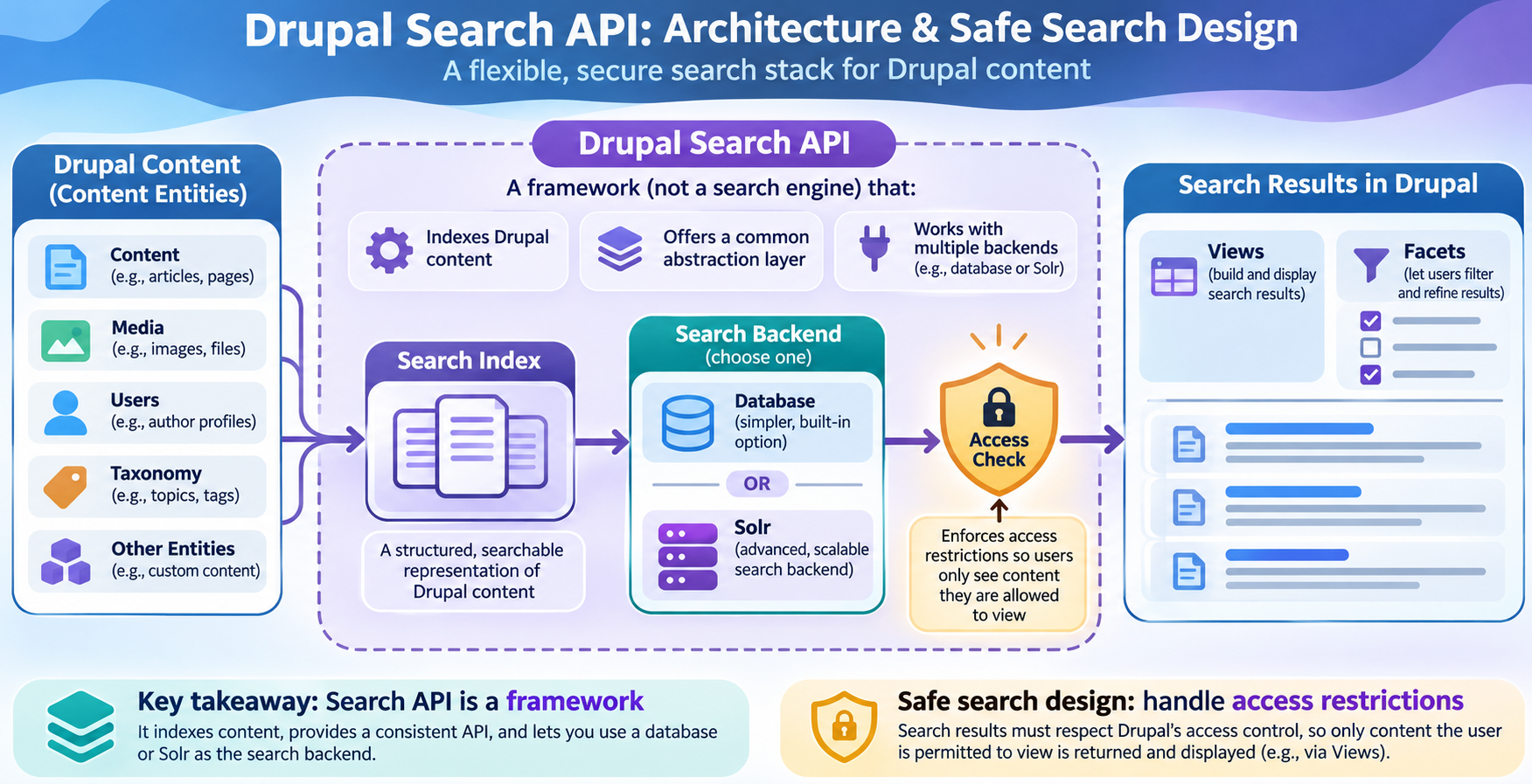
Editorial illustration; the architecture and labels are representative rather than a live Drupal administration screen.
Site search often starts with a narrow request: “Can we search articles by title?” Later, users ask for filters, related content, files, product categories, authors, date ranges and results that respect permissions. If the original search was not designed for those questions, each improvement becomes a workaround.
Drupal Search API provides a framework for creating searches over Drupal entities and working with different search backends. It is not a single search engine. The project page describes integrations with Views, facets and backends such as the database and Apache Solr. That flexibility is useful, but it means the site builder must make deliberate choices about what is indexed and who can see results.
Summary
- Treat Search API as a framework: define indexed content, fields, processors, backend and result display separately.
- Start with the database backend for a smaller or exploratory site; consider Solr when search requirements justify another service to operate.
- Test permissions, unpublished content, filters, reindexing and failure behavior before exposing search to visitors.
What Search API provides
Search API creates a common configuration layer between Drupal content and the search backend. You define a server, an index and the fields or processors that shape searchable data. A display layer such as Views can then present the results, and Facets can help users refine them when the site needs that interaction.
This separation is valuable because the content model and the search engine do not have to be designed as one inseparable feature. It also creates more responsibilities: an index can become stale, a field can be missing, access rules can be misunderstood and a backend can require its own monitoring.
Start with the questions users ask
Before installing extra modules, write down real searches. Examples include:
- “Find installation guides for product X.”
- “Show public news from this year about topic Y.”
- “Filter help articles by platform and audience.”
- “Find a document by title or reference number.”
For each question, identify the content entity, fields, language, publication state and access rule involved. This turns “make search better” into a testable design. If the question cannot be answered by the available content model, adding a search backend will not solve the underlying problem.
Design the index in layers
1. Choose the entities
Decide whether the index includes nodes, media, users, taxonomy terms or custom entities. Indexing everything is not automatically helpful. A public help search may need articles and PDFs but not internal notes or user profiles.
Make the inclusion rule explicit. For example: “Index published knowledge-base nodes and their approved media references; exclude drafts and internal content.” The rule should be understandable to an editor who later changes a content type.
2. Choose searchable and displayed fields
Titles, body text, summaries, tags and reference numbers may have different search value. Add fields because a user question needs them, not because the field exists. Decide whether a field should contribute to matching, appear in results, or support a facet.
Consider language and normalization. A search for a product code may need exact matching, while a body field needs tokenized text. Test accents, plural forms, punctuation and common spelling variations with actual content.
3. Use processors with a reason
Processors can alter how data is indexed or how results are handled. A processor may help with aggregation, language, content access or other behavior, but each one adds a rule to understand and test. Document why it is enabled and what failure would look like.
Do not enable every available processor as a precaution. Search configuration becomes difficult to debug when no one knows which transformation changed a result.
4. Pick a backend that matches the operating capacity
The project documentation describes a database backend for smaller sites and testing, while larger or more demanding search systems may use Solr or another backend supported by the ecosystem. The choice is not only about speed. It also affects deployment, backups, monitoring, schema changes, indexing jobs and operational skills.
For a small site, a database-backed index may be the easier starting point. For a large catalogue or complex relevance and faceting needs, a dedicated search service may be appropriate if the team can operate it. Do not promise a performance improvement until you measure representative queries and content.
Build the result display with Views
Views can query a Search API index and control how results are displayed, sorted and filtered. Start with a useful result row: title, content type, date, short context and a link. Add a facet only when it helps users narrow a real result set.
Test empty, broad and very specific searches. Check pagination, sorting, exposed filters, language and the way a result behaves when its source entity is unpublished. A polished filter panel is not helpful if it produces terms that return no accessible content.
Treat access control as a design requirement
The Search API project page warns that generic access restrictions are the site administrator’s responsibility, while also documenting support for node access checks and additional checks in Search Views. The practical lesson is clear: do not assume that indexing an entity automatically makes every search display safe.
Test as different roles. Include unpublished content, restricted nodes, private files and content that becomes inaccessible after indexing. Confirm both the result list and any autocomplete or facet counts. A result title, excerpt or facet can leak information even if the detail page denies access.
If the site has custom access logic, ask the module maintainer or developer how it participates in indexing and result filtering. Record the decision in the site’s technical documentation and repeat the test after changing access rules.
A safe implementation workflow
- Write five representative queries. Include an exact identifier, a broad term, a filter combination, an empty result and a restricted item.
- Inventory the content model. List entities, fields, languages, publication states and access rules.
- Choose the smallest suitable backend. Note why another backend is not needed yet and what signal would change the decision.
- Create a focused index. Add only the entity types and fields required by the queries.
- Configure processors deliberately. Record each processor’s purpose and test effect.
- Build a minimal View. Make the result row and empty state useful before adding visual polish.
- Add facets only where they reduce effort. Use labels editors and visitors understand.
- Index a representative sample, then reindex. Compare results before and after the configuration changes.
- Test roles and unpublished content. Verify results, snippets, facets and autocomplete.
- Document rebuild and failure steps. Include how to reindex, inspect queues, change a backend and temporarily communicate degraded search.
Maintenance after launch
Search is a maintained subsystem. Watch for failed indexing, stale results, slow queries, unexpected facet values and changes to the content model. When a field is renamed or a new language is added, include the index in the deployment checklist.
Schedule reindexing only when you understand its cost. A full rebuild can be expensive for a large site and may temporarily leave results incomplete. Test the procedure in a non-production environment and decide what visitors should see while the index is rebuilding.
When removing a field or module, check whether the index, View, facets or custom code still references it. A search page can continue to render while quietly losing an important field, so include query tests in release verification.
Mistakes to avoid
- Treating Search API as a complete search engine rather than a framework and configuration layer.
- Indexing private or unnecessary entities because they are available.
- Choosing Solr before the team has a deployment, monitoring and backup plan.
- Adding facets that expose internal vocabulary or create empty choices.
- Testing only as an administrator.
- Assuming a reindex fixes every issue when the underlying field or access rule is wrong.
My Take
Search quality is usually a content-model and governance problem before it is a backend problem. Search API gives Drupal site builders useful pieces, but the best result comes from starting with user questions, a narrow index and explicit access tests. That approach keeps the configuration explainable as the site grows.
Bottom Line
Design the index before tuning the search. Choose entities and fields deliberately, pick a backend the team can operate, use Views and facets to answer real questions, and verify access for every role. A smaller search that users can trust is more valuable than a broad index nobody can maintain.